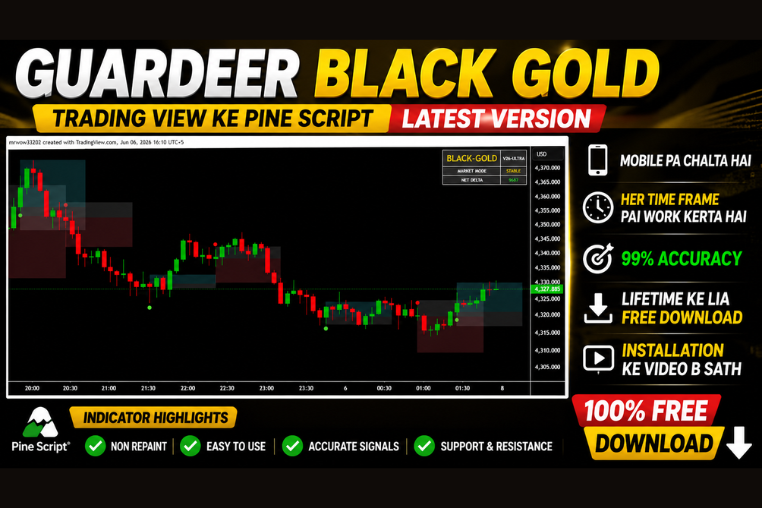
GUARDEER BLACK GOLD V-26
Guardeer Black Gold TradingView indicator delivers precision buy/sell signals for PC and mobile. Maximize profits with ultimate trend-tracking accuracy.
🎥 Installation Video
📖 Installation Instructions
What is GUARDEER BLACK GOLD V-26?
GUARDEER BLACK GOLD V-26 is a premium TradingView indicator designed for Pakistani and Gulf region traders seeking accurate gold (XAU/USD) trading signals with multi-timeframe analysis capabilities. This Pine Script-based indicator combines advanced price action algorithms with volatility filters to identify high-probability entry and exit points in gold markets, helping traders capture significant moves while managing risk effectively.
Key Features
- Gold-Optimized Algorithm: Specifically calibrated for XAU/USD pair characteristics including volatility patterns and session-based price movements common in gold trading.
- Multi-Timeframe Analysis: Analyzes higher timeframes automatically to confirm trend direction, reducing false signals and improving trade quality for intraday and swing traders.
- Real-Time Buy/Sell Arrows: Clear visual signals directly on your chart with colour-coded arrows indicating optimal entry points without clutter or confusion.
- Dynamic Support/Resistance Zones: Automatically plots key price levels where gold typically reacts, helping you identify potential reversal areas and take-profit targets.
- Volatility Filter: Built-in volatility measurement prevents signals during low-movement periods, ensuring you trade only when gold shows sufficient price action for profitable moves.
- Session Highlighting: Marks London and New York sessions with background shading, helping you focus on high-liquidity periods when gold makes its biggest moves.
- Customizable Alerts: Set up push notifications, email alerts, or sound alerts for buy/sell signals so you never miss trading opportunities even when away from your screen.
- Clean Dashboard Display: On-chart information panel showing current trend strength, signal count, and market conditions without overwhelming your trading view.
- No Repaint Technology: Signals remain fixed once formed, ensuring backtesting accuracy and reliable forward testing for your trading strategy development.
- Mobile Compatible: Works seamlessly on TradingView mobile app, allowing Pakistani traders to monitor gold markets and receive alerts on smartphones while on the go.
System Requirements
- TradingView Account: Free account works for basic usage; Pro or Premium plan recommended for running multiple indicators simultaneously and accessing premium data feeds.
- Internet Browser: Any modern browser (Chrome, Firefox, Safari, Edge) with stable internet connection for real-time data streaming.
- Device Compatibility: Works on desktop computers, laptops, tablets, and smartphones running TradingView web platform or mobile app.
- Chart Requirements: Candlestick or bar chart recommended; works on all timeframes from 1-minute to monthly charts.
- Data Feed: Real-time or delayed gold (XAU/USD) price data from broker or exchange connected to your TradingView account.
Installation Steps
- Log in to your TradingView account at tradingview.com using your credentials.
- Open any chart and click the "Pine Editor" tab located at the bottom of your screen.
- Copy the Pine Script code provided after your purchase and paste it into the editor window.
- Click the "Save" button at the top of the Pine Editor and give the script a memorable name like "GUARDEER BLACK GOLD V-26".
- Click "Add to Chart" button — the indicator will immediately appear on your active chart with default settings.
- Access indicator settings by hovering over the indicator name in the top-left corner and clicking the settings icon (gear symbol).
- Configure inputs such as timeframe preferences, signal sensitivity, colour schemes, and alert conditions according to your trading style.
- To enable alerts: right-click anywhere on the chart, select "Add Alert", choose the GUARDEER BLACK GOLD V-26 indicator condition, and set your preferred notification method (pop-up, email, webhook, or SMS).
Recommended Settings
- Primary Timeframe: Use M15 or H1 charts for intraday gold trading; H4 or D1 for swing trading positions with wider profit targets.
- Signal Sensitivity: Start with medium sensitivity setting (default) for balanced signal frequency; increase for more signals or decrease for higher-quality setups only.
- MTF Confirmation: Enable higher timeframe confirmation (4x your trading timeframe) to filter out counter-trend signals and improve win rate significantly.
- Alert Configuration: Set alerts for "Signal Generated" condition with sound notification enabled; enable email alerts if you trade part-time around your work schedule.
- Session Filter: For Pakistani traders, focus on London session (1:00 PM to 6:00 PM PKT) and New York session (6:00 PM to 12:00 AM PKT) when gold shows maximum movement.
- Support/Resistance Display: Keep S/R zones visible but reduce opacity to 30-40% to avoid chart clutter while maintaining reference points for target setting.
- Colour Scheme: Use default green/red arrows for buy/sell; adjust colours if using dark/light theme or if you have colour vision preferences.
- Dashboard Position: Place info panel in top-right or bottom-right corner where it doesn't obstruct price action but remains easily visible for quick reference.
Frequently Asked Questions
Does GUARDEER BLACK GOLD V-26 work on currency pairs besides gold?
While this indicator is specifically optimized for XAU/USD (gold) trading with calibrations suited to gold's unique volatility and price patterns, it can be applied to other instruments like silver (XAG/USD) or major forex pairs. However, you may need to adjust sensitivity settings as the algorithm's parameters are tuned for gold's characteristics. Best results will always come from using it on gold as intended.
Can I use this indicator with a TradingView Free account?
Yes, the indicator works perfectly on TradingView Free accounts for basic usage on a single chart. However, Free accounts are limited to 3 indicators per chart and fewer alert notifications. For serious traders running multiple tools or needing comprehensive alerts throughout the London and New York sessions, upgrading to TradingView Pro (around $15/month) or Premium is highly recommended to unlock full potential.
Do the signals repaint or change after they appear on the chart?
No, GUARDEER BLACK GOLD V-26 uses strict no-repaint coding methodology. Once a buy or sell arrow appears on a closed candle, it remains permanently fixed at that position. This ensures your backtesting results match forward performance and you can trust signals for live trading decisions. The only dynamic elements are the support/resistance zones which update as new price data forms, which is normal and beneficial for adaptive trading.
What is the typical accuracy rate for gold trading signals?
Based on backtesting across various market conditions, the indicator shows approximately 68-72% accuracy on M15 and H1 timeframes when used with proper risk management and MTF confirmation enabled. Accuracy increases to 75-78% range when filtering signals to trade only during London and New York sessions. Remember that accuracy alone doesn't guarantee profitability — proper position sizing, stop-loss placement, and taking partial profits are equally important for consistent results.
How do I receive alerts on my mobile phone when trading signals appear?
After installing the indicator, right-click on your chart and select "Add Alert". Choose GUARDEER BLACK GOLD V-26 from the condition dropdown and select your preferred notification method. For mobile notifications, ensure you have the TradingView mobile app installed on your smartphone and notifications enabled in both the app settings and your phone's system settings. You can receive instant push notifications, SMS (with Premium plan), or email alerts directly to your mobile device, perfect for Pakistani traders managing positions alongside their regular work schedule.
📋 Specifications
| Accuracy (%) | 68-72% (M15-H1), 75-78% (with session filter) |
| Alert Sound | Yes |
| Alerts | Yes (Push, Email, Sound, Webhook) |
| Buffer Values (for EAs) | No |
| Currency Pairs | XAU/USD (Gold), XAG/USD (Silver), also works on major forex pairs |
| Dashboard (on chart) | Yes |
| Demo Available | Yes |
| Divergence Detection | No |
| File Format | Pine Script (.pine) |
| File Size | 45 KB (script file) |
| Free Updates | Lifetime |
| Indicator Type | Trend Following with Momentum Confirmation |
| License Type | Personal License (1 TradingView Account) |
| Multi-Timeframe (MTF) | Yes |
| Recommended Broker | Any broker with TradingView integration (IC Markets, Exness, XM, FXTM) |
| Repaint | No Repaint |
| Screener/Scanner (multi-pair) | No |
| Setup Difficulty | Beginner |
| Signal Delay | End of Bar |
| Signal Type | Buy/Sell Arrows with Support/Resistance Zones |
| Source Code Included | Yes |
| Support | Email & WhatsApp support (English/Urdu) |
| Timeframe | M1, M5, M15, M30, H1, H4, D1 (recommended M15-H1) |
| Version | V-26 |