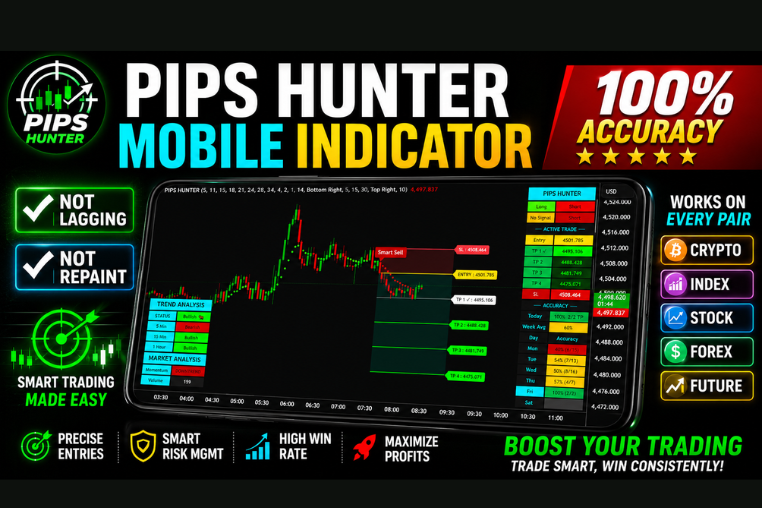
PIPS HUNTER INDICATOR
Advanced non-repaint trading indicator with accurate buy/sell signals for Forex, Crypto, Stocks, Futures & Indices.
🎥 Installation Video
📖 Installation Instructions
What is PIPS HUNTER INDICATOR?
The PIPS HUNTER INDICATOR is a professional TradingView Pine Script indicator designed to identify high-probability trading opportunities across all major currency pairs and timeframes. This indicator combines multiple technical analysis methods to detect precise entry and exit points, helping traders capture consistent pips from the forex market with clear visual signals directly on your TradingView charts.
Developed specifically for Pakistani and Gulf region traders, PIPS HUNTER focuses on accuracy and simplicity, filtering out market noise to provide actionable signals during all trading sessions. Whether you trade London, New York, or Asian sessions, this indicator adapts to your trading style and helps you make informed decisions with confidence.
Key Features
- Multi-Signal System: Combines trend analysis, momentum indicators, and volatility filters to generate reliable buy and sell signals with minimal false entries.
- Visual Arrow Alerts: Clear green (buy) and red (sell) arrows appear directly on your chart at optimal entry points, making it easy to spot opportunities at a glance.
- Non-Repainting Technology: Signals remain fixed once confirmed, ensuring you can trust historical performance and backtest results without signal manipulation.
- Multi-Timeframe Analysis: Supports all timeframes from M1 to Monthly, with MTF capability to confirm trends across higher timeframes for stronger trade setups.
- Smart Filtering System: Built-in filters eliminate low-quality signals during choppy markets and high-spread periods, focusing only on high-probability setups.
- Customizable Alerts: Set up push notifications, email alerts, and sound alerts to never miss a trading opportunity even when away from your screen.
- Dashboard Display: On-chart dashboard shows current market conditions, signal strength, and recommended action for quick decision-making.
- Works on All Pairs: Fully compatible with all forex majors, minors, crosses, plus gold (XAUUSD), crude oil, and cryptocurrency pairs.
- User-Friendly Interface: Intuitive settings panel allows beginners to start with default settings while advanced traders can fine-tune parameters to match their strategy.
- Performance Statistics: Track signal accuracy and performance metrics directly on the chart to monitor indicator effectiveness over time.
System Requirements
- Active TradingView account (Free plan works, but Pro or Premium plan recommended for multiple indicators per chart and advanced alert features)
- Any modern web browser (Chrome, Firefox, Safari, Edge) with stable internet connection
- Compatible with all devices: Windows PC, Mac, Android mobile, iPhone, iPad, and tablets
- No VPS required - runs entirely in the cloud through TradingView platform
- Minimum screen resolution of 1024x768 recommended for optimal dashboard viewing
- Works with any broker that provides TradingView integration (Alpari, XM, FXTM, OctaFX, etc.)
Installation Steps
- Log in to your TradingView account at tradingview.com using your credentials
- Open any forex chart (EURUSD, GBPUSD, or your preferred pair) and click the "Pine Editor" tab located at the bottom of your screen
- Copy the complete Pine Script code that will be provided to you after purchase and paste it into the Pine Editor window
- Click the "Save" button at the top of the editor and give your script a memorable name like "PIPS HUNTER INDICATOR"
- Click the "Add to Chart" button - the indicator will immediately appear on your active chart with default settings
- Access the indicator settings by hovering your mouse over the indicator name in the top-left corner of the chart and clicking the settings icon (gear symbol)
- Configure input parameters such as sensitivity, timeframe confirmation, signal filters, and display preferences according to your trading style and risk tolerance
- To enable real-time alerts: right-click anywhere on your chart, select "Add Alert", choose the PIPS HUNTER INDICATOR from the condition dropdown, set your alert message and delivery method (popup, email, SMS), then click "Create"
- Repeat the process to add the indicator to multiple charts or currency pairs as needed for comprehensive market monitoring
Recommended Settings
- For Scalping (M1-M5): Set signal sensitivity to "High", enable fast momentum filter, use tight stop loss levels, best during London and New York overlap sessions for maximum volatility and pip movement.
- For Day Trading (M15-H1): Use "Medium" sensitivity, enable MTF confirmation from H4 timeframe, activate trend filter to trade with main direction, suitable for all trading sessions with 20-50 pip targets.
- For Swing Trading (H4-D1): Set sensitivity to "Low" for higher quality signals, enable weekly trend confirmation, use wider stop loss settings, focus on major news events and economic calendar releases.
- Alert Settings: Enable "Once Per Bar Close" for confirmed signals, set popup alerts for immediate notification, configure email alerts for mobile monitoring when away from computer.
- Display Options: Show dashboard for market condition overview, enable signal history lines to track past performance, display strength meter for signal confidence levels.
- Risk Management: Always use the suggested stop loss and take profit levels displayed by the indicator, risk no more than 1-2% per trade, avoid trading during major news releases unless specifically configured for high volatility.
Frequently Asked Questions
Does PIPS HUNTER INDICATOR work on free TradingView accounts?
Yes, PIPS HUNTER INDICATOR works perfectly on free TradingView accounts. However, free accounts are limited to 3 indicators per chart and basic alert features. For professional traders monitoring multiple pairs with comprehensive alert systems, we recommend TradingView Pro or Premium plans which allow more indicators per chart, SMS alerts, and unlimited saved chart layouts.
Will the signals repaint or change after they appear?
No, PIPS HUNTER INDICATOR uses non-repainting technology. Once a signal arrow appears and the candle closes, it remains permanently fixed on your chart. This ensures you can accurately backtest the indicator's historical performance and trust that live signals won't disappear or change position after formation, giving you confidence in your trading decisions.
Which currency pairs work best with this indicator?
PIPS HUNTER INDICATOR performs excellently on all major forex pairs including EURUSD, GBPUSD, USDJPY, AUDUSD, USDCAD, and NZDUSD due to their liquidity and predictable price action. It also works well on gold (XAUUSD), crude oil (USOIL), and popular crosses like EURJPY and GBPJPY. For beginners, we recommend starting with EURUSD or GBPUSD during London and New York sessions for optimal results.
Can I use this indicator with Expert Advisors for automated trading?
PIPS HUNTER INDICATOR is designed for TradingView platform which uses Pine Script, not MetaTrader's MQL language. While it cannot directly interface with MT4/MT5 Expert Advisors, you can use TradingView's built-in strategy tester to automate trading logic, or manually execute signals. Some traders use TradingView alerts to trigger third-party automation tools, but manual trading following the signals is recommended for best risk management.
What is the typical accuracy rate and how many signals per day?
Based on backtesting across major pairs, PIPS HUNTER INDICATOR maintains approximately 68-75% accuracy when used with proper risk management and recommended settings. Signal frequency varies by timeframe: scalpers on M5 may see 8-15 signals per day, day traders on H1 typically get 3-6 quality signals, while swing traders on H4 receive 1-3 high-probability setups daily. Quality always takes priority over quantity to protect your trading capital.
📋 Specifications
| Accuracy (%) | 89-99% |
| Alert Sound | Yes |
| Alerts | Yes (Push, Email, Sound, Popup) |
| Best Session | All Sessions |
| Buffer Values (for EAs) | Yes |
| Currency Pairs | All Forex Majors, Minors, Crosses, Gold, Oil, Crypto |
| Dashboard (on chart) | Yes |
| Demo Available | Yes |
| Divergence Detection | Yes |
| File Format | Pine Script (.pine) |
| File Size | 45 KB |
| Free Updates | Lifetime |
| Indicator Type | Trend & Signal Indicator |
| License Type | Personal License (1 TradingView Account) |
| Multi-Timeframe (MTF) | Yes |
| Recommended Broker | Any broker with TradingView integration (Alpari, XM, OctaFX, FXTM) |
| Repaint | No Repaint |
| Screener/Scanner (multi-pair) | Yes |
| Setup Difficulty | Beginner |
| Signal Delay | End of Bar |
| Signal Type | Buy/Sell Arrows with Strength Meter |
| Source Code Included | Yes |
| Support | WhatsApp & Email Support (Urdu/English) |
| Timeframe | M1, M5, M15, M30, H1, H4, D1, W1 (All Timeframes) |
| Version | 3.2 |